
In my last Tech Skills article I discussed the need to have some basic understanding of website statistics. In this article I stay on the stats topic and look at what you should understand about Facebook statistics, or as they are know, Facebook Insights.
Hopefully you are very active on your Facebook page. Hopefully that activity is just not you randomly posting whatever comes to mind. You should have a content strategy for your posts. One of the tools to help you determine what should be in that strategy and what is working and what isn’t working are Facebook Insights. There is a depth of information you can discover in your Facebook stats.
Unfortunately most bands seem to only worry about one Facebook stat, Page Likes. They put all their efforts into growing that number bigger and bigger. Without much thought to the activity of engaging with your fans on your page. This is a wrong strategy. The more you engage with your fans the more your Likes will grow organically… meaning you won’t have to pay for Likes.
So lets look at some of the Facebook Insights and what they mean.
First thing… you will find your Insights by clicking the Insights link near the very top of your Facebook page. Only page admins will see this link.
Page Likes – We all know this, this is how many people Liked your page. Are they really fans? Nope, not by just clicking Like. I would argue they don’t become a fan until they actually engage with you on the page.
People Reached/Post Reach – This is how many people were reached or had the potential to see your posts. Think of this as potential eyeballs. They may not have done anything other than saw a post in their newsfeed or saw a friend engaged with your post.
Facebook defines as: Post reach is the number of people who have seen your post. Your post counts as reaching someone when it’s shown in News Feed. Figures are for the first 28 days after a post was created and include people viewing your post on desktop and mobile.
Shares – On each post you can see how many people have shared that post. Each share means one fan felt connected enough to share this post on their personal wall for their friends to see. More shares means more eyeballs on your post.
Post Likes – On each post you can see how many people have liked that post.
Note: The metrics you see on a Page post when viewed from your Page’s Timeline or in News Feed include likes, comments and shares that happened on the original post. The metrics in yourPage Insights include likes, comments and shares from the original post plus any activity that happened if your post was shared. For example, if someone shares your post, and then their friend shares that post, this will be counted as 2 shares in Page Insights.
Comments – Pretty obvious, fans who had something to say.
Pay attention to Shares, Likes and Comments on all your posts. This basic data will help you determine what is working and what isn’t working.
The Overview tab under Insights:
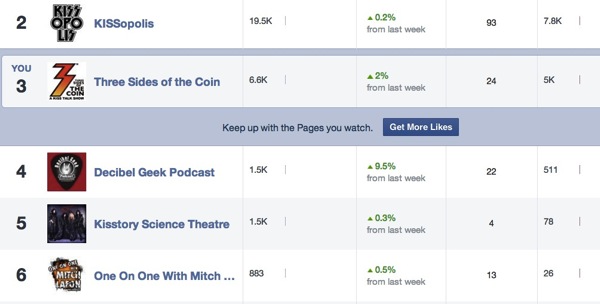
Pages To Watch – Want to see what your competition is doing? How you stack up against them? Enter a few pages here and you can get some basic data on their performance. Total page likes, New page likes, Posts made this week, Engagement this week.
The Posts tab under Insights:
When Your Fans Are Online – Helpful data to tell you when your fans are online during the day and what days. Don’t get so caught up in trying to only schedule posts during peak times. I feel posting content will always trump waiting for the right time to post.

All Posts Published – Great data on each post. A posts reach, a posts engagement, You can sort the data to see what performed best and what was the worst.
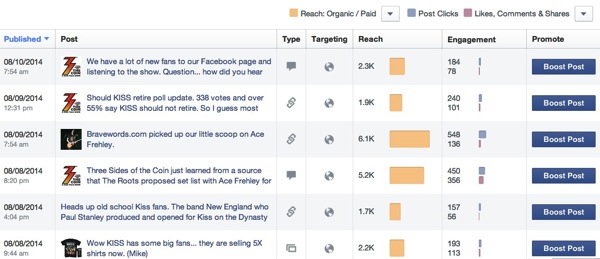
You can also look filter this to look at:
- Post Clicks, Likes, Comments and Shares.
- Like, Comments and Shares.
- Post Hides, Hide All Posts, Report of Spam, Unlike of Page – this is especially helpful in telling you what post might actually be hurting you.
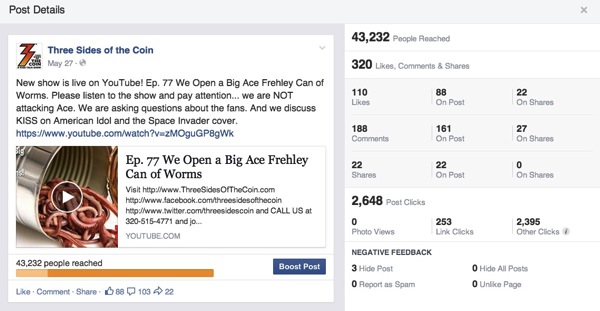
If you click on a specific post in the list it will open a window with greater detail on that posts performance.
The People tab under Insights:
Demographics – age, sex, location and language
This can be helpful to tell you where your fans are located. Possible markets that you weren’t aware of. Also helpful in telling you if you should geotarget posts and even consider translating some of your posts into other languages.

Check out this page on Facebook that will help answer more of your questions about Facebook metrics, https://www.facebook.com/help/336143376466063/
So this might seem like a lot of stats to watch. If a client asked me to really strip it down to what are the most important things to watch:
- Shares of a post
- Likes of a post
- Comments on a post
- Total Post Reach
Notice that total page likes is not in that list. Pay attention to your posts and likes will come organically.






This is a great breakdown of Facebook stats, Michael, and I do believe it’s something every musician on Facebook should know about.
It is a little trickier to know what is and what isn’t working when you have a smaller fan base, however. What would you suggest an artist do if they simply don’t have a big enough sample to work with?