
I recently came across a article by Amp Music that talked about a little trick how you can overlay your website url on a YouTube video and have it clickable, leaving YouTube. Basically you are creating a Google AdWords account and inserting your own ad on your own video. The article below goes on to explain how to do this. It is not quite as straight forward as they indicate, and at least my experience in doing this was not the exact same step by step as Amp Music outlined. But I was able to create a AdWords account, setup a ad and insert the ad onto one of my videos.
Give it a try!
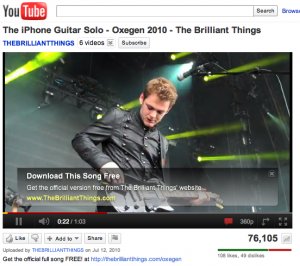
YouTube is the number one place that people go to find music online, so it’s no surprise that many musicians are realizing the importance of establishing a proper presence on the site. But a big question still remains – you’ve put in all the effort to grow an audience and get a load of hits on your videos – now what?
What you want to do next is acquire the fan and connect with them somehow. They may be the kind of person that “subscribes” on YouTube, but most people aren’t, so what you want to do is try get them back to your website to either get their email address or get them to purchase.
Traditionally, the best way to do this was with a link in the description box, but here’s a little tip from us on how to get a much more prominent, clickable link on the video:
Read the entire article via How To Convert Youtube Views to Fans, Subscribers & Sales – Amp Music Marketing.








Very useful! Thanks.