
Facebook is changing all pages over to the new Timeline, like it or not. Here are the five things that if you address on your Facebook page you should be in pretty good shape.
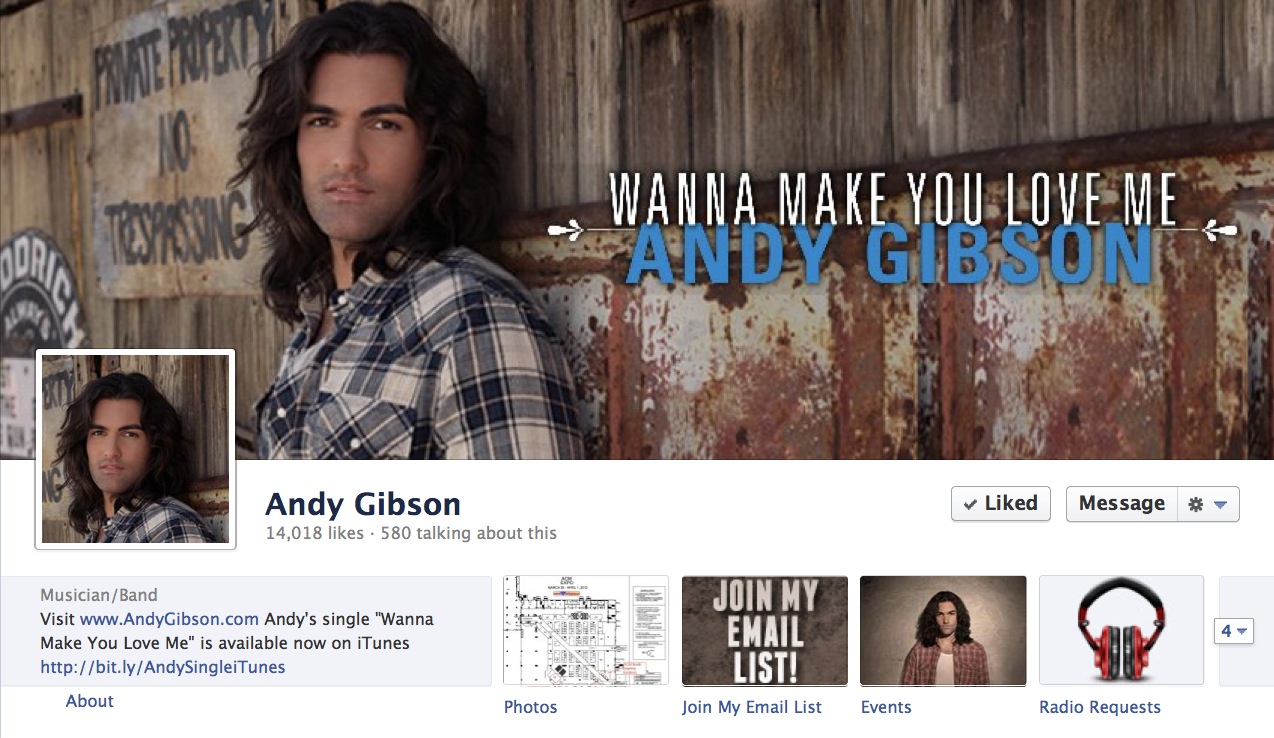
Five things to do to your new Facebook Timeline page:
1. Create a Timeline cover image
The size of the Timeline cover image is 851 x 315. There are clear restrictions on what you can do in the image. Don’t be afraid to change the cover image frequently.
Rules for the Timeline image: Covers may not display calls to action or references to Facebook features such as “Like this Page”, purchase or pricing info such as “40% off” or “Download at our website”, or contact information such as web address.
2. Profile image
This is by default your old page image. You can update this and the same restrictions for the Timeline cover DO NOT apply. You can message within this image. But, keep in mind it is also your post icon so text may be too small to read. Again, don’t be afraid to update often.
3. About
Right below the profile image if a small section of About copy. USE THIS! You can insert clickable links in this section. Use this to promote your website, Twitter, online store, or maybe a Facebook app. Again, update often.
4. Featured Apps
You can have four featured apps displayed just below your cover image. One is photos, the other three you can control. Click the little arrow on the right end of the row of apps to start editing and moving your apps. You can also add your own custom app icons to third party apps. Facebook apps you can’t change the icon. Icon size is 111 x 74. Change the apps displayed and their icons!
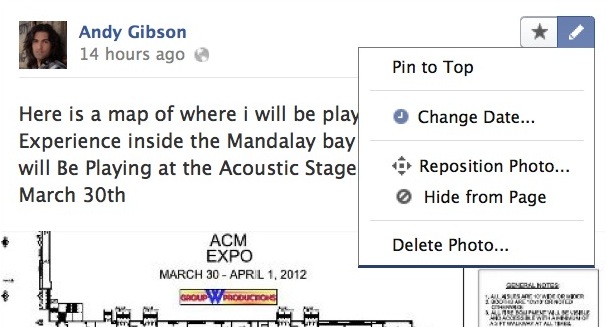
5. Pin a post
Left column just below the About section is where you can pin a post for seven days. Top right corner of a post you can select Pin to Top. Do this with important messages. But remember they only stay pinned for seven days, so you need to repine a post.
Couple other notes about the new Timeline that you should be aware of:
Events
On the old page when you created a Event it was automatically added to your wall, not any more with Timeline. You actually have to share your own Event and post on your own page to added it to the Timeline.
Posts by Others
On the old page you used to be able to see your wall displaying all your posts and posts by your fans. Its not quite the same any more. If you want to see posts by fans you need to use the drop down menu in the center just above your status update field to select Posts by Others. Or, if you have the Posts by Others box selected to display on your page look in the box and select See All.
Message
Fans can now send you messages on your Page. Be sure you are checking the messages in the admin area.
There you go, do these five things and your page will be in good shape.








Thank you again, Amigo. I’ve been putting off a review of my pages, but now I have a concise to-do list.
Glad to hear it is helpful Tony… have a great day!
Michael, aloha. Though I have been growling and struggling with mine, I was still “stuck.”
Your “to do” list is a big help and I will finish it this weekend. Thanks so much. Aloha. Janet
Glad to hear you found it helpful, thanks for sharing it.
Thanks for this Michael! No one seems to be explaining the changes at all, let alone how best to take advantage. Much appreciated!
m/
Excellent advice as always, Michael. Thanks a lot. Tweeted!
Thanks for explaining a few of the rules. It doesn’t make any sense that one can not put a website url in the timeline image. I wonder if it’s because Facebook doesn’t want fans to leave the page to go to another site and loose revenue.
The advice here is still as valid now as it was several months ago. I’ve been focusing on Twitter for a while now but need to get my act together on Facebook. So this is a brilliant start. Thank you.
Thank you, glad I could help.