
Facebook has begun rolling out Call To Action buttons on pages. Everyone with a page should immediately setup the button on their page. See the Shop Now button in the image below, that is the Call To Action for this page.
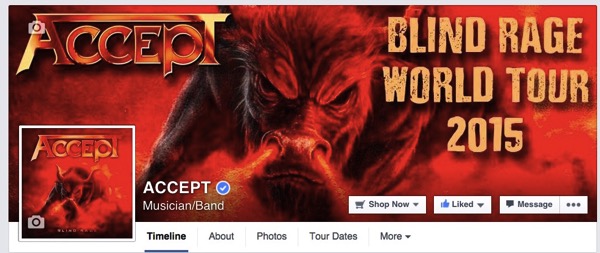
It only takes a couple minutes to activate the Facebook Call To Action button and is extremely simple. Let’s get started.
1. Click the button on your cover image to Create or Edit the Button.
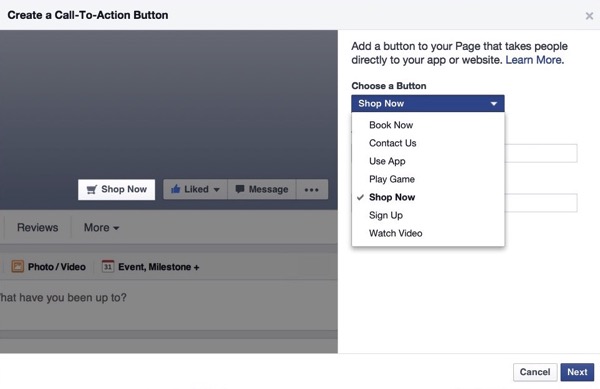
2. Choose what you want the button to say. Book Now, Contact Us, Use App, Play Game, Shop Now, Sign Up or Watch Video. No you can’t customize what the button says, but you should be able to these with no problem.
Here are some suggested uses:
- Book Now – link to the contact us page on your website.
- Shop Now – link to your online store or iTune or Bandcamp.
- Sign Up – link to your email list signup page.
- Watch Video – link to a video clip or your YouTube channel.
Once you select the button you want just paste in the full URL you want to link to.
3. Click Next a couple times and you are done!
You can edit and change the button any time you want. Maybe promote a video leading up to a album release. Then change it to promote a iTunes purchase.
Also take note that on the right side of your page there is a new section of data called CTA Clicks. This will tell you daily how many clicks the button is getting. Pay attention to this. If you see nobody is clicking change it. Experiment to find a Facebook Call To Action that works.









Thanks Michael, you da guru!
Step 1… Click what button????
Can’t see any way to do this?
It is possible your page doesn’t have the Call To Action yet, Facebook is rolling it out. You will see it if you have it.
Can’t wait until it shows up on my page! I wonder how long it will remain a free feature?